


What is Remote Support? A Complete Guide
Introduction
The way we work has fundamentally changed. With hybrid work environments, distributed teams, and the need to support devices across multiple locations and operating systems, the ability to connect and troubleshoot remotely has become essential for modern IT operations. But what exactly do we mean by "remote access" and "remote support"? While often used interchangeably, these terms describe distinct capabilities that serve different business needs.
Remote access enables users to connect to and control computers or devices from a distance—useful for employees accessing work files from home or traveling.
Remote support software, on the other hand, allows technicians to view, control, and run diagnostics on a remote device to troubleshoot issues and resolve problems without asking the user to do anything. Understanding the difference between these two capabilities—and knowing when to use each—is critical for building a resilient, efficient IT operation.
What is Remote Access?
Remote access is the ability to connect to a computer, network, or device from a different physical location. It enables users to access files, applications, and resources as if they were sitting at their own desk, regardless of where they actually are. This capability has become the backbone of modern work flexibility.
How Remote Access Works?
Remote access works through a secure digital connection between your device and the remote computer or network. Here's the basic flow:
- Connection Initiation: A user launches remote access software on their local device and enters credentials or authentication information.
- Authentication & Encryption: The connection is verified through secure protocols—typically TLS 1.2 transport security with AES-256-bit encryption—to ensure only authorized users can connect.
- Secure Tunnel: Once authenticated, a secure "tunnel" is established between the user's device and the remote computer.
- Access & Control: The user can now view the remote screen, access files, run applications, and interact with the system in real-time, as if they were physically present.
The technology sits quietly in the background, handling the complexity of transmitting data securely across networks and the internet while maintaining reliability and responsiveness.
Common Remote Access Use Cases
Working from Home & Hybrid Environments
- Employees can access their office desktops, company applications, and shared network drives from home, maintaining productivity without being physically present.
On-the-Go Access
- Sales teams, consultants, and field workers access important files and applications from mobile devices or laptops while traveling, ensuring they have the information they need when they need it.
Accessing Desktop Files Remotely
- Retrieve documents, presentations, or data stored on your primary work computer from any location or device.
Distributed IT Management
- IT teams monitor and manage endpoints across multiple locations from a centralized console, deploying updates and managing devices without requiring on-site visits.
What is Remote Support?
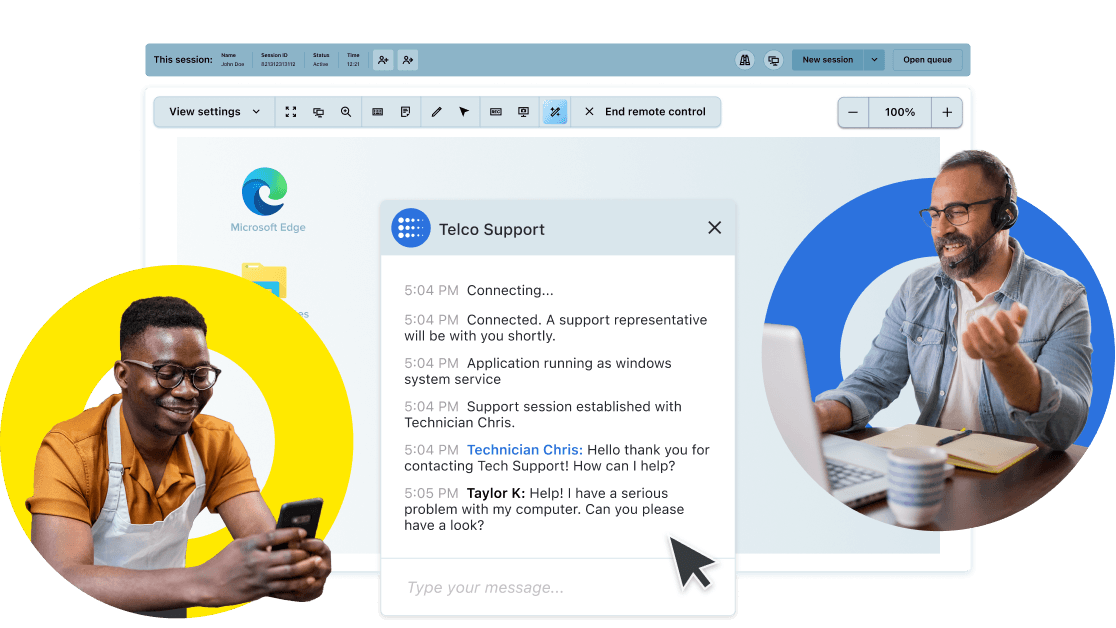
Remote support is the ability for an IT technician or support professional to connect to a user’s device from a separate location and diagnose, troubleshoot, and resolve technical issues in real time without needing to be physically present. Remote support software allows IT teams and customer support specialists to take control of a user's device to diagnose, troubleshoot, and resolve technical issues quickly and efficiently.
Before remote support technology, help desks and call centers provided support over the phone, email, or chat, where end users described problems, technicians tried to figure out what was happening, and customers executed step-by-step instructions for possible remedies. This process was time-consuming and frustrating for everyone involved.
That all changed with the arrival of remote support software. By letting customers and employees grant permission for technicians to establish a remote connection to their device, remote support dramatically accelerated the support process and reduced frustration. Technicians can now view, control, and run diagnostics on a remote device without needing the user to do anything. They can transfer files, configure settings, troubleshoot issues, and resolve problems on their own. This is clearly a better experience for the customer or employee, who can sit back while the technician solves their issue. It's also a better experience for technicians, especially with the right remote support platform that makes their jobs easier. By taking control of the device, agents can work with it as if it was sitting on the desk in front of them to work more quickly and productively.
Remote support is used across a wide range of scenarios, including:
- Employee IT help desk support — resolving software errors, connectivity issues, and hardware configuration problems
- Customer-facing technical support — assisting customers with product setup, troubleshooting, and onboarding
- Managed IT services — allowing IT providers to monitor and maintain client systems remotely
- Enterprise endpoint management — keeping devices, applications, and operating systems up to date across large organizations
Attended vs. Unattended Remote Access
Attended Remote Support
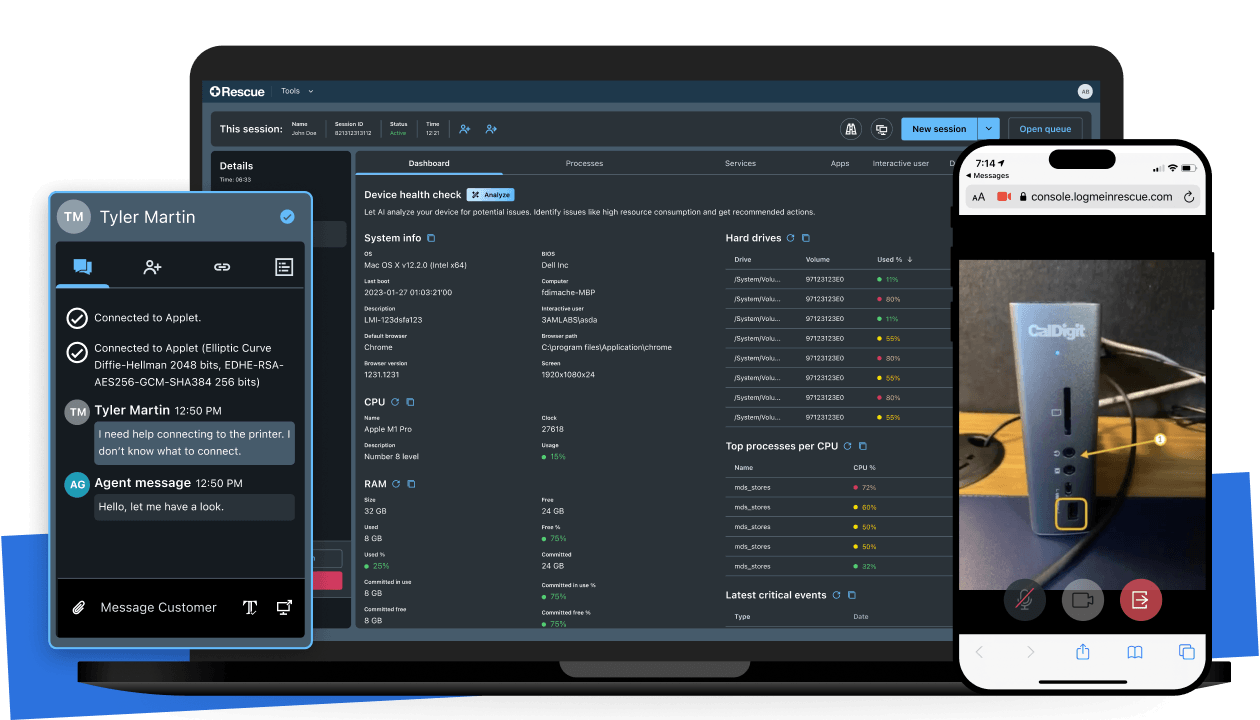
- Attended remote support is when an end user is present while the support session is in progress. When the end users encounter a technical issue, they can reach out to a support team who will start an ad-hoc support session. This may be to help users solve an issue with a connected device like a desktop, laptop, smartphone, or tablet, where the agent can remotely access and take over the device. Or it may be to help users solve an issue with physical equipment or spaces that are not connected, meaning the agent will not be able to take over the device using a remote access connection. In this case, the agent can see the physical equipment by accessing the camera on the end user’s mobile device, rather than rely on that end user’s (often non-technical) description of the issue.
Unattended Remote Support
- Unattended remote support is when an end user is not present while the support session is in progress. This allows agents to provide support after hours or during end user downtime, to automate routine maintenance, and even deploy software and updates without the end user. This eliminates any disruption in the end user's day.
Common Remote Support Use Cases
IT Helpdesk Troubleshooting
- Help desk technicians diagnose and resolve employee issues, such as connectivity problems, software errors, printer configuration and hardware failures without requiring on-site visits, dramatically reducing mean time to resolution (MTTR).
Software Installation & Configuration
- Deploy applications, configure complex settings, or manage software licenses across devices remotely, ensuring consistency and reducing deployment time.
Customer Support & Technical Assistance
- Customer support teams assist clients with product issues, troubleshooting, and onboarding, providing faster resolutions and improving customer satisfaction.
Proactive Maintenance & Patching
- Automatically deploy security patches, system updates, and software fixes to endpoints without user intervention, keeping devices secure and up to date.
Hardware Diagnostics & Repair Guidance
- Technicians run diagnostic tools on remote devices to identify hardware issues and either resolve them remotely or provide repair guidance to users.
Empower your enterprise remote IT support with LogMeln Rescue
- Enterprise-grade security
- Administration & Reporting
- Artificial Intelligence
- Customization & Branding
- Remote Camera Sharing
What is Remote Assistance?
Remote assistance is a form of remote support where an IT technician or support specialist connects to an end-user's device while the user is present and actively participating in the session. Also referred to as a remote assistance service, it is the technology that powers help desks, IT support teams, and managed service providers. The end-user grants permission and watches as the technician works through the issue, maintaining visibility and control over the process. Remote assistance creates a collaborative support experience where both parties are engaged in solving the problem.
It's important to note that remote assistance isn't limited to technical support. Customer service teams can provide remote assistance in many ways, including walking customers through digital experiences with co-browsing and providing warranty support and product demonstrations with camera-sharing. These visual engagement solutions allow organizations to provide concierge-level customer experience (CX) at a distance.
Remote Assistance vs. Remote Support
While these terms are often used interchangeably, there's an important distinction:
Remote Assistance - Remote assistance typically implies an ad hoc, collaborative session where the end-user explicitly grants permission and watches the technician work. It's real-time, interactive, and requires the user to be present. This is ideal for complex issues that benefit from dialogue, or for scenarios where maintaining user trust and transparency is important, particularly in customer-facing support.
Remote Support - Remote support is a broader term that encompasses both attended assistance and unattended background maintenance. It includes immediate, interactive troubleshooting sessions and scheduled, after-hours device management that happens without user involvement. Remote support is the umbrella category; remote assistance is one specific type within it.
Remote Access vs. Remote Support: What’s the Difference?
The terms “remote access” and “remote support” are often used interchangeably, but refer to two distinct capabilities. Understanding the key differences are critical to avoid tool sprawl or overlapping features in your tools when evaluating what solution is best for your IT team.
Remote access is the ability to connect to a computer, device, or network from a separate location. It’s primarily driven by end-users who need flexibility and productivity. The goal is to enable employees to work from anywhere by accessing their own computers, files, and applications remotely, as if they were sitting at their desk. Remote access is typically user-initiated and supporting ongoing work sessions throughout the day. With remote access, users maintain full control; IT technicians aren't typically involved unless specifically called upon.
Remote support, by contrast, is driven by IT technicians and support specialists who need to troubleshoot and resolve technical issues on another user's device. The primary goal is problem-solving and rapid issue resolution. Remote support sessions are typically initiated either by the technician or through permission from an end-user experiencing a problem. The technician takes temporary control of the device to diagnose, run diagnostics, transfer files, configure settings, and resolve the issue without asking the user to do anything.
Remote assistance sits at the intersection of both — it describes the act of a technician actively helping a user through a live remote session, combining the connectivity of remote access with the service intent of remote support.
Key Distinction – remote access is about connecting to a system, while remote support is about helping someone on that system or device.
Is Remote Support Secure?
Security is the number one concern for organizations deploying remote access and support solutions. Most enterprise remote support tools use multiple layers of security to ensure that sessions are safe, authorized, and auditable.
- End-to-End Encryption - All data transmitted between devices should be encrypted using industry-standard protocols like TLS 1.2 with AES-256-bit encryption to ensure that sensitive information remains unreadable to unauthorized parties.
- Permission Controls & Session Management - Granular permission controls allow you to define exactly what each technician can access and do during a session. Session controls should include the ability to restrict file transfer, disable clipboard access, limit to read-only viewing, or disable keyboard/mouse control. These controls prevent accidental or intentional misuse of elevated access.
- Zero Trust Architecture - Leading remote support platforms implement zero trust principles, meaning every connection—regardless of source—is verified and authenticated before access is granted. No device or user is automatically trusted; every request is validated.
- Audit Logging & Compliance - Detailed session logs and audit trails provide accountability and help meet regulatory compliance requirements (HIPAA, GDPR, SOC 2, etc.).
- Device & Connection Security - Your platform should support device authentication, ensuring that only approved, properly configured devices can establish remote connections.
- Session time limits – Sessions automatically terminate after a defined period or when the user ends the connection.
How to Choose the Right Remote Support Software for Your Needs
Selecting the right remote support solution depends on your specific operational needs. Ask yourself these key questions:
- Scale: Do you need to support an entire IT department or just a handful of remote employees?
- Platform Support: Do your users work across Windows, Mac, iOS, and Android? Your solution should support all platforms from a single console.
- Integration: What existing tools does your team use? (ServiceNow, Microsoft Teams, Intune, etc.) Your solution should integrate seamlessly.
- Security: What regulatory requirements do you need to meet? (HIPAA, GDPR, SOC 2, etc.)
- Reliability: What uptime guarantee does the provider offer? Look for 99.9% or higher for mission-critical operations.
- Deployment: How quickly can you get up and running? Cloud-delivered solutions typically deploy faster than on-premises options.
- AI Capabilities: Does the platform include AI-powered automation to help your team work more efficiently?
What is LogMeIn Rescue and How Does it Work?
LogMeIn's suite of remote support and access solutions addresses these requirements across different organizational needs. LogMeIn Rescue is an enterprise-grade remote support platform designed for IT help desks, support organizations, and managed service providers. It enables technicians to connect to remote computers, mobile devices, and unattended systems quickly and securely — without requiring a pre-installed agent on the end user's device. LogMeIn Rescue provides fast, reliable remote support built for moments when failure is not an option, with 12+ flexible connection options, enterprise-grade security, and seamless integrations with Nextthink, ServiceNow, Microsoft Teams, and other platforms.
Whether you're supporting a handful of remote employees or managing a complex, multi-platform IT environment for an enterprise or MSP, the right solution should be proven, secure, and designed to make your team more efficient.
Finding Your Remote Support Solution
Remote access and remote support have transformed how modern organizations operate. Remote access enables flexibility by letting employees work from anywhere while maintaining access to the tools and information they need. Remote support enables efficiency by letting technical teams resolve issues faster, proactively maintain systems, and reduce downtime.
While distinct in purpose, both capabilities are essential elements of a modern IT strategy. The key is selecting a platform that combines proven reliability, robust security, ease of use, and seamless integration with your existing tools.
Ready to find the right remote support solution for your organization? Download our comprehensive Buyers Guide to Remote Support and explore the features, capabilities, and considerations that matter most when choosing a platform.
Is remote access and remote support safe?
What is the difference between a VPN and remote access?
What is the difference between remote assistance and remote support?
Can I provide remote support or access my computer from a mobile device?
